Google My Business Action Plan

Setup & Requesting Reviews

Setup is not specifically setting up reviews on your GMB, but setting up your “system” for getting reviews.

To start, you can either gather reviews yourself or hire a  “review management” or “reputation management” company.

This is basically an automated system of gathering reviews. 

While the primary focus of the ActionPlan is on the  Do-It-Yourself (DIY) method, I’ll quickly address reviews companies, what they do, why you may need one and…WHAT TO AVOID!

Automated Review Management (Optional)

DIY Review Management This just means YOU are managing the reviews yourself. (Which is primarily what the rest of this section covers) Automation Review Management Is using software to solicit the reviews for you. This is primarily to grow your reviews…but YOU still have to manage them. Automation is good for businesses that:
  • Service A LOT of clients daily AND/OR
  • Cater to a niche that may have reviews on many different platforms other than Google My Business ( Ex. Zillow, TripAdvisor, HomeAdvisor, Houzz etc.)
Review Gating (Warning) Before we briefly cover automation, you need to at least understand the Google rules and the term Review Gating. Review gating is soliciting feedback from a customer, and then deciding whether to ask them for a Google review based on their response.
  • Review gating strictly against Google My Business’ review guidelines and comes with heavy penalties!
  • Google can remove all reviews left on your Google My Business profile.
  • Not just the ones left since you were discovered actively review gating or using a platform that allowed it…
  • It can remove all of your Google reviews, going back to the beginning of time.
RULES FOR REVIEWS (Straight from Google):
  • Don’t use reviews for advertising purposes. This includes, but is not limited to, posting email addresses, phone numbers, social media links, or links to other websites in your reviews.
  • Don’t discourage or prohibit negative reviews or selectively solicit positive reviews from customers. (Gating)
  • Don’t include promotional or commercial content.
  • Don’t offer or accept money in exchange for reviews.
  • Don’t solicit reviews from customers in bulk.
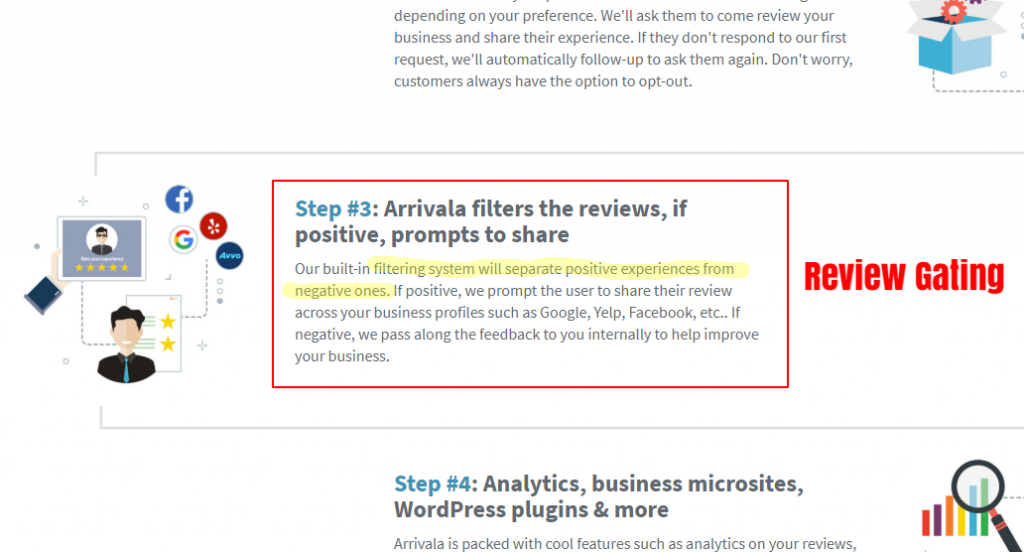
Since this is currently difficult for Google to monitor, many review management software companies take advantage of this and continue to Gate reviews, because it works and gets a lot off positive reviews. For Example: If you still want to use automation software… The best use for automation software is for gathering all your reviews from the top reviews sites online and allowing you to mange them from one application. It can solicit the reviews from customers, as long as it just points them directly to the review platforms you like to use. Remember: The software should NOT allow you to review the review before getting published on the review site. The only one that I would currently recommend confidently would be: GatherUp  GatherUp.com: Plans start at $75 per month. This was developed from Mike Blumenthal who is a Local SEO analyst and noticed years ago that reviews would be a game changer for local small businesses and conversions. Best features of using GatherUp:
  • Monitors reviews from over 40 different review sites in one dashboard (Great if you service a lot of customers and in a specific niche)
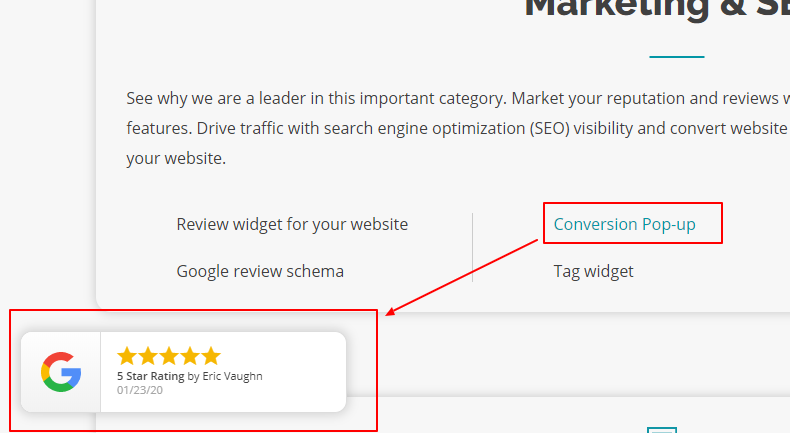
  • Conversion Popup on your website
    Big Well Known Review/Reputation platforms to avoid: Reputation.com, Birdeye, Yext, Arrivala and Podium. (Not saying they “allow” review gating…but they are too close and overcharge for nothing the two above do really well)

Finding Your GMB Review Link

Note:

You’re going to want to send customers to your Google My Business to leave a review. 

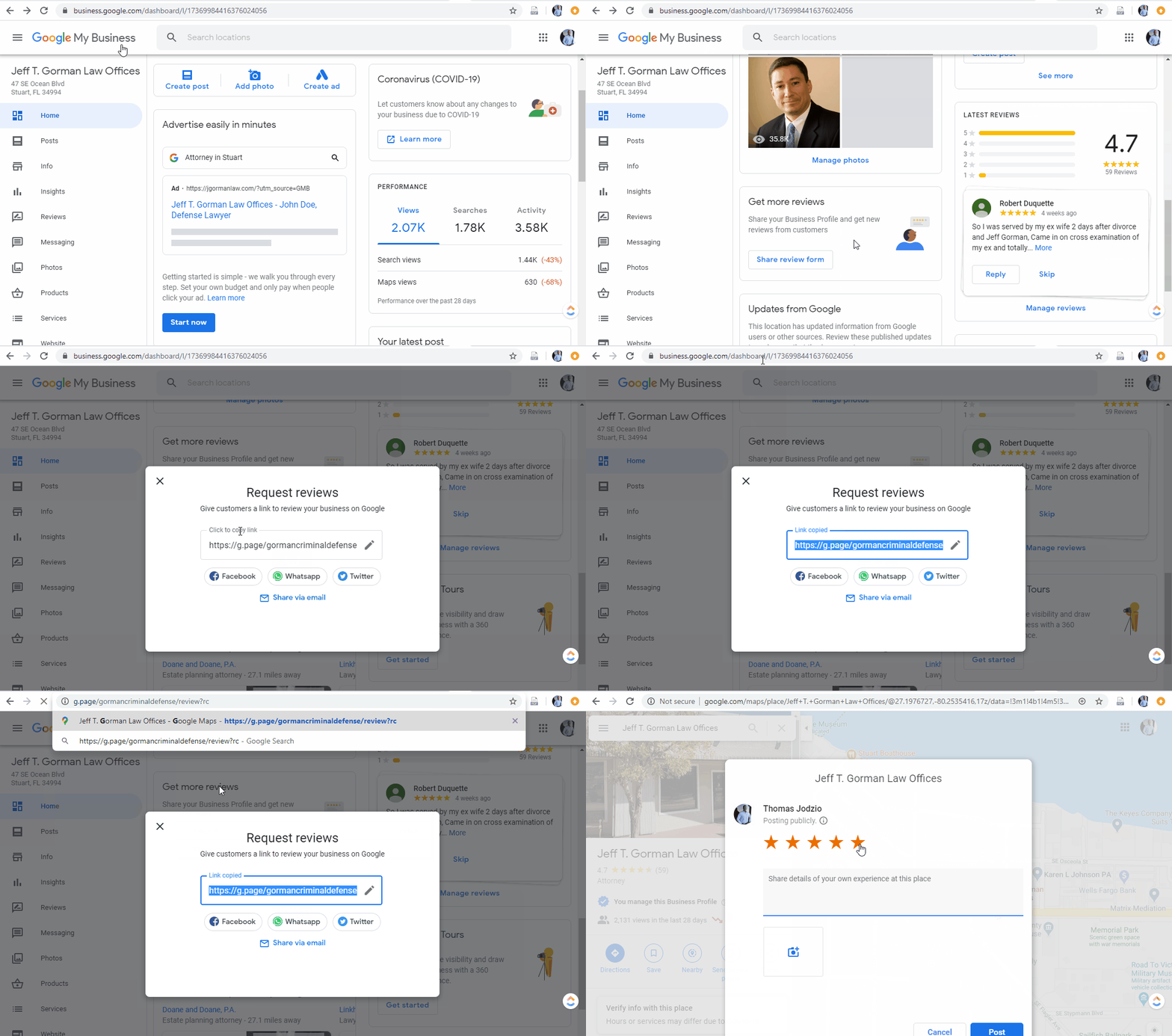
Here is the process for getting your GMB Review Link

So let hit on a few 

  • Go here: https://support.google.com/business/answer/7035772?hl=en
  • Enter your business name and/or address to get your link.
  • Save this link in your notepad for easy reference.
  • Any time you finish working with a customer (and you are confident they are happy), then send them an email like this:


Where To Put Your Link

Note:

Add a link to the signature of your emails.

You can do this manually in your email application or use an online tool like WiseStamp to generate the signature in any email application.

Wisestamp.com

Here is an quick tutorial on adding a review link to your email signature using WiseStamp. (The overall process can be used for basically any email signature application)

Note:

Add a link to the signature of your emails.

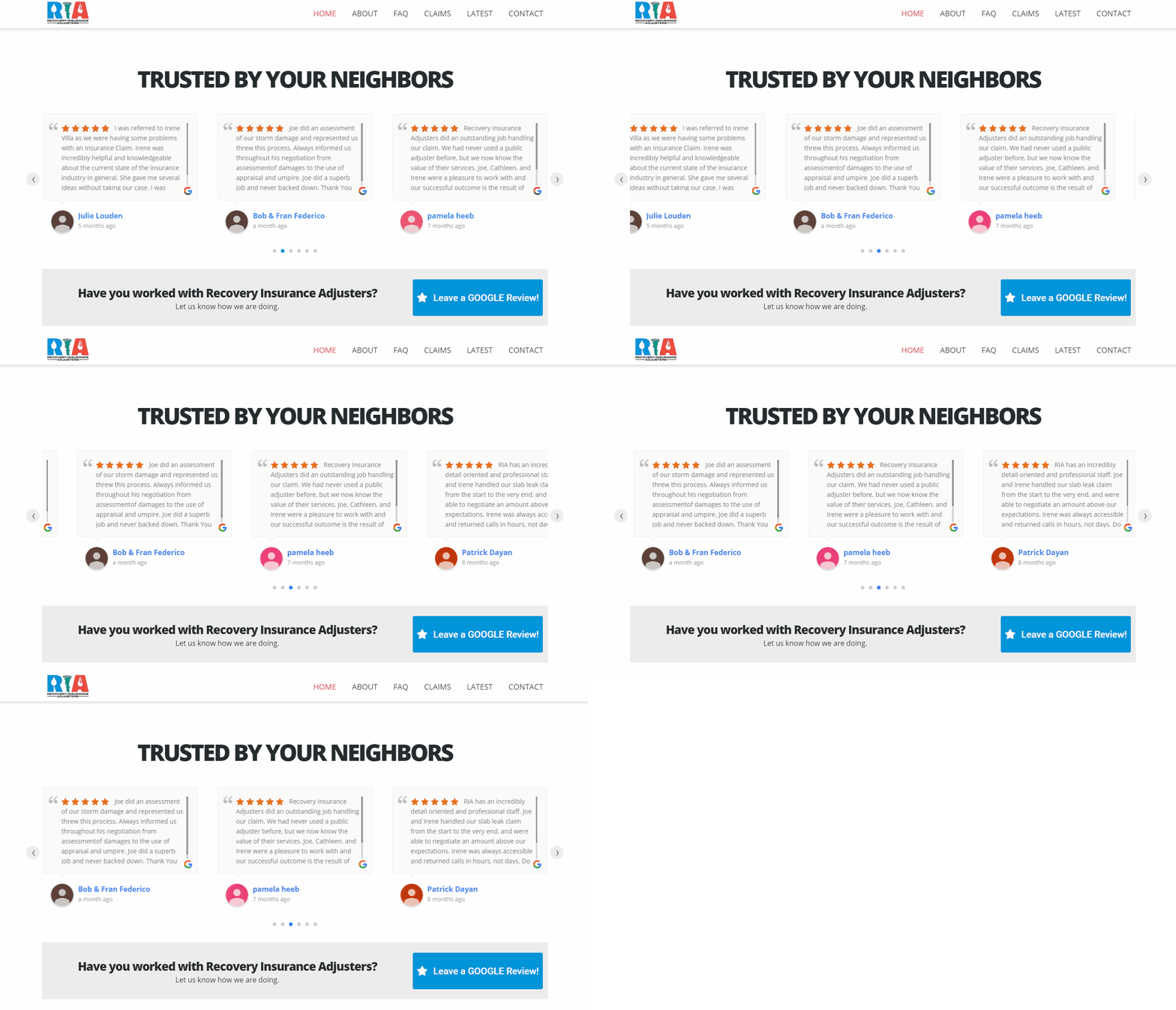
Ideally, once you have a few reviews you should promote them on your website. This will help give credibility and trust to your site.

Example of Schema Review formatting which is pulling the reviews from Google My Business and displaying them live on the website.

ADDITIONALLY

You want to add a button, image or text link somewhere visible on the website, which makes it easy for clients to access your Google My Business reviews. 

Something like this… 
Note: This one is not widely known, but Google tries to help you with simple easy to use marketing materials for promoting reviews to and from your Google My Business. Marketingkit.WithGoogle.com Simply put in your business name The next page Google will provide you with everything you need!

Getting Reviews

Note:

Any time you finish working with a customer (and you are confident they are happy), then send them an email like this:

Hi [Customers Name],

I just wanted to say thanks again for being a valued customer of [ Your Company Name].

If you have 2 minutes, I’d really appreciate if you left a review on our Google Listing.

Here is the link: [Add your GMB review link]

Have any feedback for me personally? Feel free to reply to this email and let me know.

Thank you,

[Your name and position]

Additional Tips:

  • Delegate this process to someone customer facing in your company.
  • Make this an explicit responsibility for whoever is in charge of it.
  • Have a specific trigger in your normal invoicing/payment process where these emails are sent.
  • If whoever is responsible isn’t sending these emails consistently enough, then I would recommend blocking off a time in their calendar 1-2 times a week for them to do this.

Here are some more phrases you can incorporate into your content to get more Google customer reviews:

  • Reviews on Google help us to help more people like you. When you have a minute, please share your feedback about our business!
  • Got a minute to review us on Google? We’d love to get your feedback.
  • Thank you for choosing our business! Let us know how we’re doing by dropping us a quick Google review!
  • We appreciate your input! Help us continue providing the best service by posting a review on Google.
  • Leave us a quick review on Google! This helps people who need our help to find us.


“The money is in the follow up.”

This couldn’t be more true for getting reviews from your customers.

They’ve got lives just like you:

  • Maybe they’ve got children screaming at them.
  • Maybe they’ve got a boss that just came by their desk.
  • Or maybe they’re checking their phone while binge-watching a Netflix series.

Either way, they’ve got other things going on, so your email asking for a review is not on the top of their to do list.

To SERIOUSLY increase your chances of a Review…follow this process:


3 Days After Initial Request:
Follow up with them, asking for the review and offering your help with any questions.

Here is an example:

Hi there,

Hope your day is going well 🙂

I just wanted to follow up on my last email regarding a review.

As a valued customer, your feedback goes a long way, so we’d really appreciate it.

Here’s the link again: [Add link]

Do you have any questions?

If you hit reply to this email, I’ll be here to help.

Thank you,

[Your name and position]

5 Days After Second Request:
Send one last follow up. This should state that this will be the last time you ask for a review, and offer your support if they need anything.

Here is an example:

Hi there,

Sorry to bother you again (this is the last time I’ll email you about this).

We noticed that you haven’t had a chance to leave a review on our Google listing yet.

If you have about 90 seconds to spare, you can do it here: [Add link]

Thanks again for your business 🙂

[Your name and position]


Additional Tips:

If you aren’t using any sort of automation, remembering to send follow ups every 3 and 5 days can be challenging.

If this is the case, then do this:

  • Block out 30 to 45 minutes in your calendar on Monday and Friday afternoon.
  • Send your review requests (and any follow ups) during this time.

Some other conditions:

  • Don’t send these emails over weekends or on holidays.
  • If you have the option of sending a follow up email sooner (before 3 or 5 days) or later – then go with later. Reviews are important, but keeping your customers happy is the priority.


Now that you’ve got your Google review shortcut link, it’s time to look at various ways to present this link to customers to get more Google customer reviews for your business.

  1. Create “Leave us a Review” Cards
    Have physical cards made up with a shortened version of your Google review link. Something like this could work:

    Review Us on Google!
    Your Google review helps others who need our services to find our business.
    Plus, your feedback equips us to continue serving you best.
    Please take a minute to rate and review us at [shortened link].
    Thank you!

  2. Ask in Person for Google Reviews
    Having a good conversation with a customer in your store? Just finished a solid support call in which the customer felt eternally grateful? In your interactions with clients, there are many opportunities to ask for Google reviews.

    • “I’m so glad to hear how happy you are with our business. Hey, if you wanted to leave that in a Google review, you’d help a lot more people like yourself to find us.”

    • “This feedback is super helpful. You know what would be awesome is if you shared that feedback online for other customers to see.”

    • “I’m so happy we could help you. If you wouldn’t mind sharing a sentence or two in a Google review, that would help us a ton.”

    And then you have that compact little card that gives them instructions to leave a review and thanks them in advance for helping your business to help more people.

  3. Emphasize to Customers How Easy it is
    One method that could help garner more Google business reviews is to emphasize customers how easy it is to leave one.
    Something like:

    • They can just leave a star rating without writing anything.

    • If they do write, the review can be one or two sentences.

    • Using terminology like “leave a review” or “drop a quick review” instead of “write a review” might feel easier.

  4. Include Google Review Links in Surveys
    Asking your customers for their feedback lets them know that you value what they have to say and have their best interests in mind. If you’ve gotten someone to fill out a poll or survey, they’re already in the proper mindset. See if you can take advantage of their momentum by asking them to review your business on Google while they’re at it.

  5. Get Google Business Reviews from Vendors and Partners
    Vendors and partners may not be customers, but they can attest to what it’s like to work with you on a regular basis. They also might be more willing to leave a Google business review if you write one for their business first.
There are markets where reviews are very difficult to get.
Customers might not want to post a review that publicly announces their divorce. A lot of people think reviews need to come from paying customers ONLY. That’s not true at all. Legitimate reviews can come from anyone who has been positively impacted by your company. So you can create a Non-Service Product for a review  

Get a Non-Service Review

For businesses in sensitive industries like legal and medical, simply create a free guides or resources that focus on truly helping people when they’re just trying to figure things out.
While this alone can be a great customer acquisition tool (the people you help will naturally want to do business with you) it has the added benefit of being a first interaction with your business. Here is how it works:
  • Create a resource (a checklist or cheat sheet) which helps your ideal prospects solve a problem.
  • Offer that resource to people if they provide their name and email address.
  • Send them the resource via email.
  • Follow up with them after 3 days asking for a review (using the review processes included).
 

QUICK LINKS

FOLLOW ON FACEBOOK

ASK. LEARN. GROW.

Join our Facebook Group and ask questions about Websites, Google Searches, Online Ads and Social Media.