This is a pretty new (and AWESOME) feature on GMB. Google is still updating it and adding more features.
Think of posting on GMB as a Social Media platform for your business. But way better then Facebook or LinkedIn!
Surprisingly, there are still many businesses missing out and not taking advantage of this. CRAZY!
They are WELL worth the effort! Do this!
PLUS, doing post qualifies you for Googles “Post Mentions” which are call outs under your Map Pack listing.
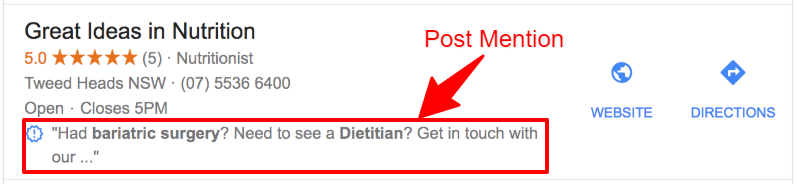
Its NOT a guarantee that you will see it there, but if you do post, its a good chance you will start to see them.
Not only can potential customers quickly see your business’ name, address and phone number, but they can also see photos of your business, read online reviews, find a description about your company, complete a transaction (like book an appointment) and see other information that grabs a searcher’s attention — all without them even visiting your website.
Sometimes the hardest part is coming up with content. Here are some quick Post content ideas to get your creative juices going:
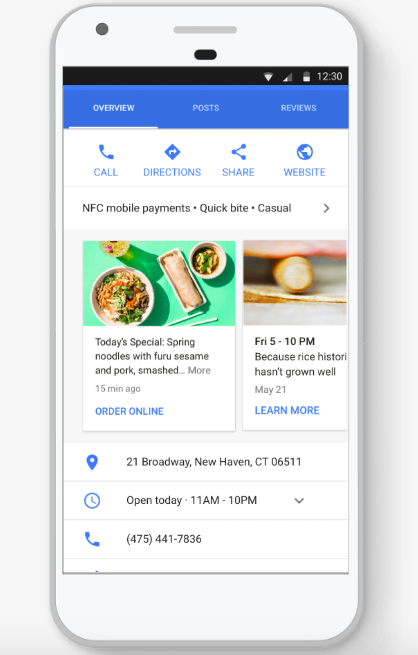 Give a quick summary of your latest blog post and link to it.
- Mention upcoming tradeshow or events you will be featured or have a booth at.
- New video on YouTube? Link to it.
- Feature one of your favorite employees – and explain why they’re your favorite.
- Highlight a new product or feature of a product or service you offer.
- Having a sale or special offer? Make that offer available to your future customers!
- Something going on in your local community? Get engaged and help promote what’s going on in your local area.
- Do you have any business news you’d like to share? GMB Posts are the place to do it!
- Have a job opening? Posts make a great “Help Wanted” signs.
- Does your biz support a local or national charity? Show your support and try and get contributions for the charity through GMB Posts.
- Post location-specific information, like changes to your business hours, emergency closures due to weather, etc.
- Show off your 5-star reviews with Small Thanks with Google.
- Running a contest or give-away? This is a fun place to promote it.
The possibilities are endless!
What You Need to Know
Hhere are a few need-to-knows that are helpful to cover upfront.
- Google deletes your post after 7 days to ensure the sharing of fresh content.
- Event Posts stay live until the event is over.
- The first 80 characters are what shows up in the Knowledge Panel.
- Your newest posts will show first and the older ones will be displayed in a carousel.
- Google will scroll up to 10 posts in a carousel but only the first 2 are seen in SERPs.
5 keys to writing a post
- Post type: Consider what you want your post to do — whether to encourage customers to visit your store, sell something, or announce a new feature.
- Photos/videos: Take a high-resolution photo reinforcing your message so your post stands out or see the section below on “Where to Get Images”.
REQUIREMENTS:- Photos: Photos should be simple, direct, in-focus and well-lit, with bright, vibrant colors. Photos should have a minimum resolution of 400px wide by 300px tall, in JPG or PNG format.
- Videos: We accept the following file formats for video: AVI, MP4, MOV, FLV, WMV, MPG, M4V, MKV, M2TS, and MTS. The maximum size for videos is 100 MB.
- Title (if your post is an event): Describe your event in 4-5 words. You have 58 characters for your title.
- More details: Be clear about the offer/event. You have up to 1,500 characters for the details of your post, but the ideal length is between 150-300 characters.
- Call to action: Include instructions such as “Buy,” “Book online,” “Learn more,” “Call,” or “Visit.”
Post examples:
Example Type: Offer
Merchant: Mike’s Family Pizzeria
Photo: Pizza
Call to action: “Call now or visit”

Kids eat free this weekend! We love families at Mike’s and to show our appreciation, all kids dining with their families this weekend will eat totally free of charge. Offer applies to kids under age 18, dining in the restaurant this Fri-Sun, April 28-30. Call now to reserve or visit!
Example Type: Offer
Photo: Puppy
Merchant: Linda’s Dog Grooming
Call to action: “Book now”

Get your best friend ready for summer with a complete grooming and paw cleanup for only $50, now through Friday. (Be sure to ask to see our selection of snazzy bandanas — free with any grooming service!) Book now!
Example Type: Event
Merchant: Tax Pros
Photo: Taxes
Call to action: “Call us”

Last-minute tax clinic
Don’t panic if you’ve left your taxes until the last minute — we’re happy to help you during our dedicated clinics. Book a 15-minute slot, beginning at 7:30 AM on April 10 through 7:30 PM on April 14, and our expert accountants will get you going in the right direction, advising on the appropriate forms, deductions and special circumstances. Call us for a free quote.
Example Type: Event
Photo: Yoga
Merchant: Om Studio and Spa
Call to action: “Book now”

Get Zen with our 30-day challenge
Pack that mat to hit the floor with fellow yogis every day in July. Our month-long challenge will bring a new energy and discipline to your practice, and all abilities are welcome. Registration opens June 10; classes start July 1. Spaces are limited so book online now. Join us and enjoy the “ommmm.”
Example Type: News
Merchant: The Down Under
Photo: Concert
Call to action: “Get your tickets”

We just released 100 extra tickets for tonight’s Rock Showcase, featuring the best of the local scene’s up-and-coming acts. Epic guitar solos probable, moshing encouraged. (The Down Under’s Rock Showcase is a 21+ event.) Get your tickets now!
Posting on Google My Business is a no-brainer for any local business that wants to stand out in Google search results. But because Google My Business posts expire after 7 days, it means that at least once a week, you have to remember to log back into Google My Business and post something again.
I recommend using Google to post and become familiar with it. Not using a scheduler.
Google My Business changes so often the online scheduler apps cannot keep up with the updates.
If you need to schedule, just make a separate calendar in Microsoft, Google or Apple that reminds you top post. Make it a habit!
However, if you would like to simplify, then you can use an online app like OneUp to create and schedule your posts.
Using OneUp to Schedule Your Post
OneUpApp.io is a social media scheduling tool that supports Google My Business, in addition to Facebook, Instagram, Twitter, Pinterest, LinkedIn, and Google+.
Cost: OneUp starts at $12/month for up to 3 social profiles, with a 7-day free trial.
Connecting your Google My Business account
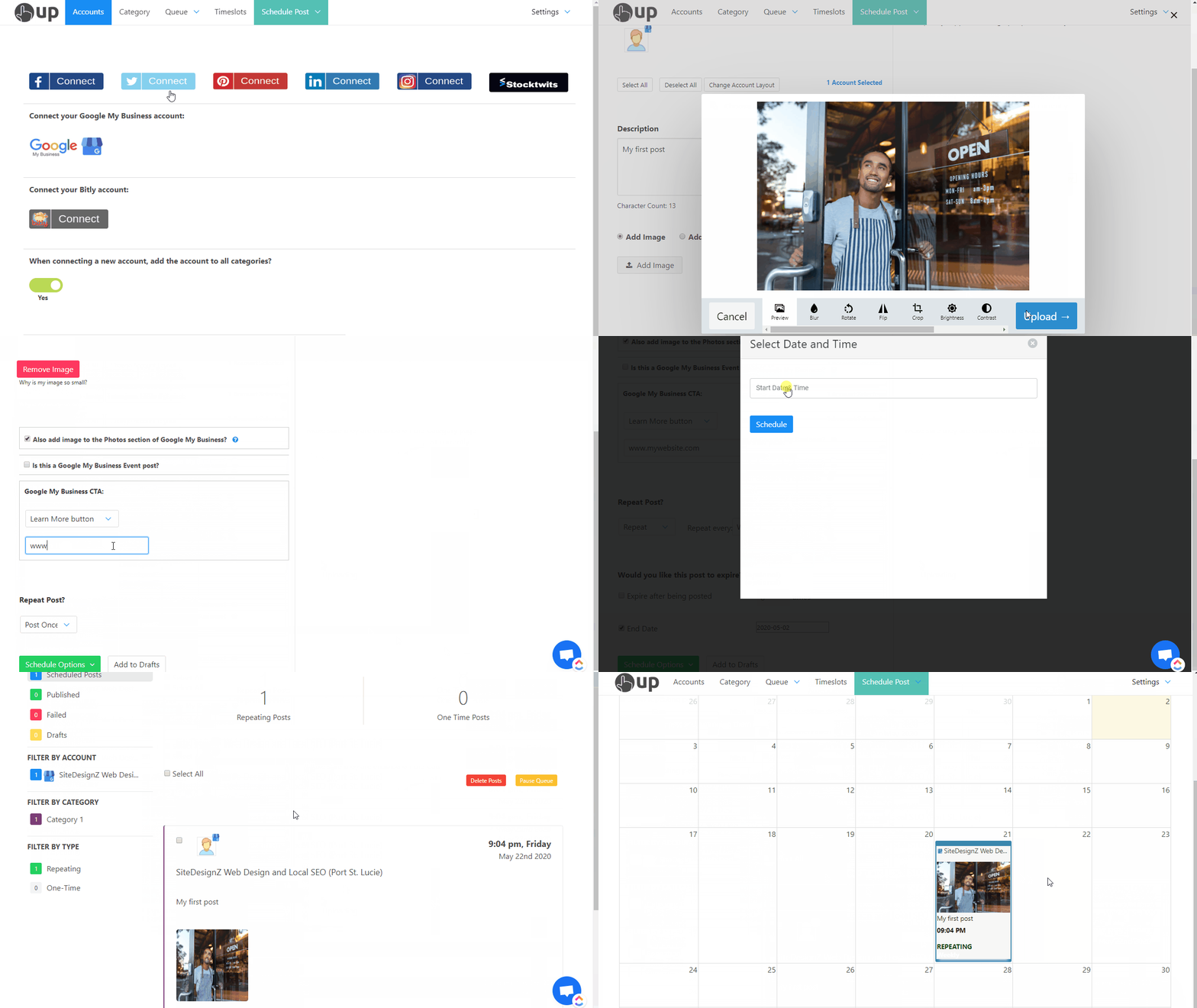
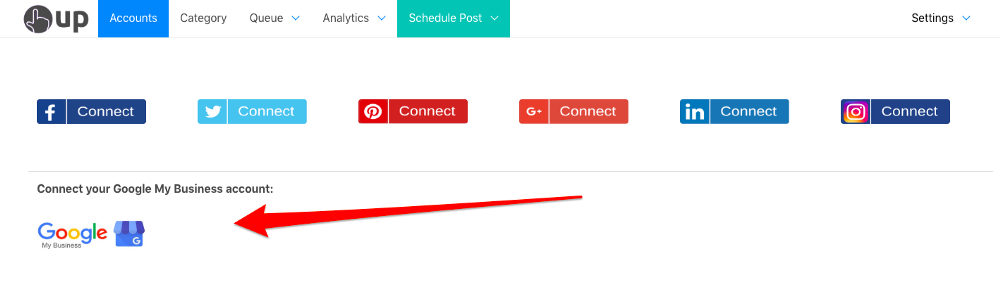
When you sign up, you can connect your Google My Business account from the Accounts page in OneUp.
Schedule a post
Click Schedule a Post to either post now or schedule it for a future time. You can add text, a link, and an image.
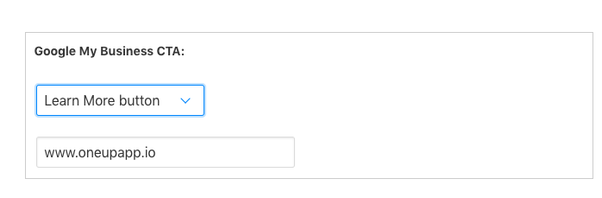
Then add your Call-To-Action button and a link.
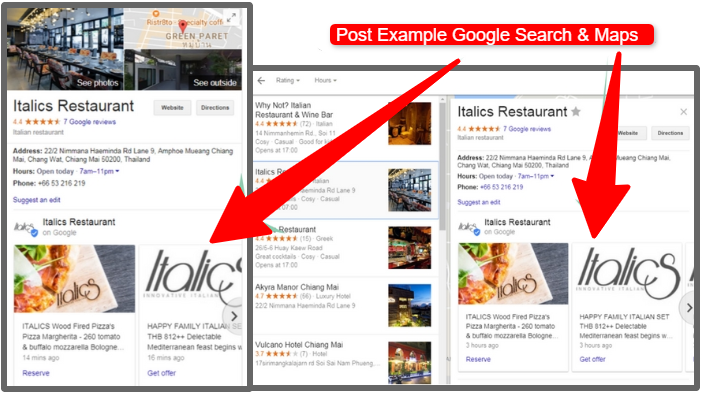
Here is what that post looks like on the Google search results page.

Set posts to automatically repeat
In addition to just scheduling posts, OneUp allows you to set Google My Business posts to automatically repeat at set intervals — such as once a week or once a month.
You can choose to have the post repeat indefinitely, or choose for it to stop after a certain date or number of times posted.
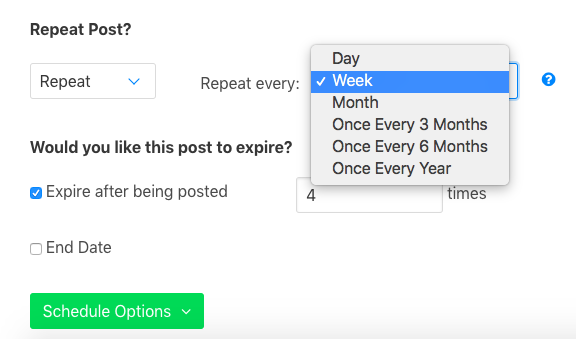
Overivew of scheduling a post using OneUp: