Google My Business Action Plan

Local Landing Pages

Local landing pages are basically the main landing page of your website.

This will be the web address (URL) that gets linked to from your Google My Business Listing.

Google will check your website to make sure your primary category on GMB reflects your website’s main focus.

So if you focus on HVAC, Plumbing and Water Softeners and you choose Plumbing as the primary category, you would want to make sure your site has more emphasis on Plumbing than on HVAC or Water Softeners.

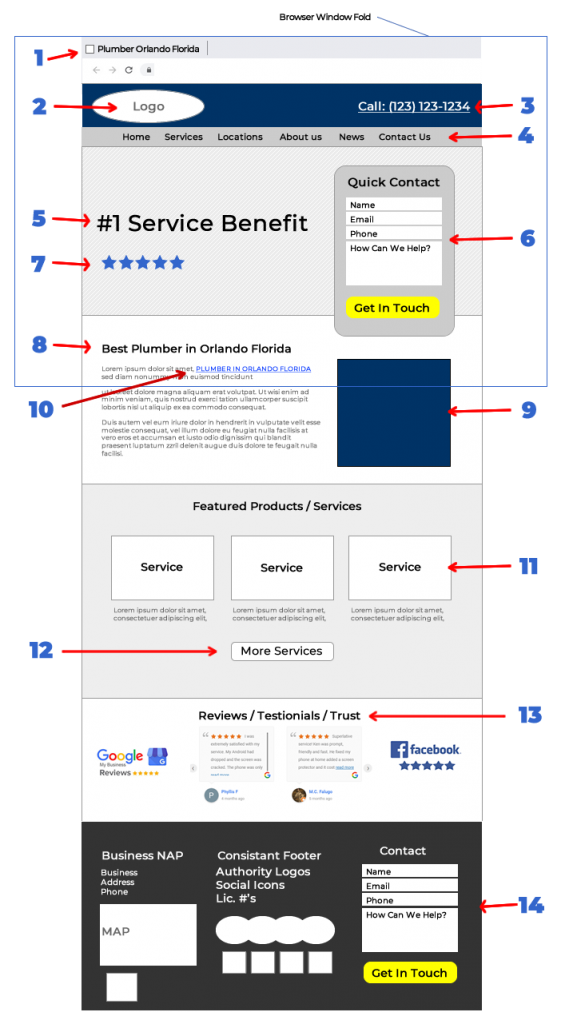
The image below details the most important items you want to make sure your landing page contains.

If you have an existing website,  you might want to look over your site and compare what it shows and make any necessary changes to help improve conversions (getting the visitor to contact you).

1. Site Title & Description

This is the Title and Description for a website when seen in Google search results. 
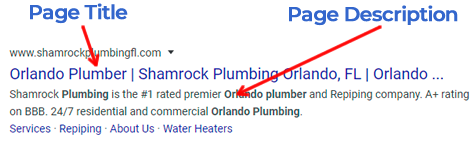
  • Page Title – Should be 50-60 characters in length and follow this template:

    Primary Focus Keyword + Location | Company Name

    Example:

    Plumber Orlando Florida | Shamrock Plumbing

  • Meta Description – This should be between 100-160 characters in length. Ideally, you want to write a compelling description of your company’s core offer which would entice people to click on your search result.

    Example:

    The best plumber in Orlando FL. 24/7 Emergency service. A+ rating on BBB and Angie’s List. See why all of Orlando contacts Shamrock for Plumbing needs (XXX) XXX-XXX.

How to check your meta tags

 
Make sure your Titles and Descriptions are DIFFERENT on each page of your site!

2. Company Logo

  • Company logo (brand) in top right or center of header. Links back to the homepage. Use the same logo which you geo-tagged and optimized for your Google My Business listing for an extra boost.

3. Local Phone Number

  • Same phone number which is the primary phone on your listing.
  • Ideally this is “clickable” and will open a phone app if used on mobile.

4. Main Navigation

  • The main navigation is primarily used for navigating the pages of your website. 
  • Mobile responsive nav should kick when browser window width is too tight for nav
  • Local businesses targeting surrounding cities should have a separate page for each location AND service.  (eg. Plumbing Phoenix  AZ,  Plumbing Scottsdale AZ, Plumbing Paradise Valley AZ)

5.  Header Call Out!

  • Your copy in this area should describe your core offer / service / product. 

  • Help the visitor understand your business in .05 Sec! 
    It takes about 50 milliseconds (that’s 0.05 seconds) for users to form an opinion about your website that determines whether they’ll stay or leave.

6. Call To Action (Quick Contact Form)

  • Since more people will be coming from Google My Business, many will be pre-sold on doing business with you. Adding a quick contact from to the top of the landing page will dramatically increase conversions!

7. Trust and Authority Badges

  • If your business has any sort of professional licenses or social proof ( Ex. Google Reviews, Affiliations, Licenses, Awards), then add it here.

8. Header Title

  • This title should include your core focus keyword and city.
  • Keep it short and sweet with the Keyword as close to the beginning as possible.
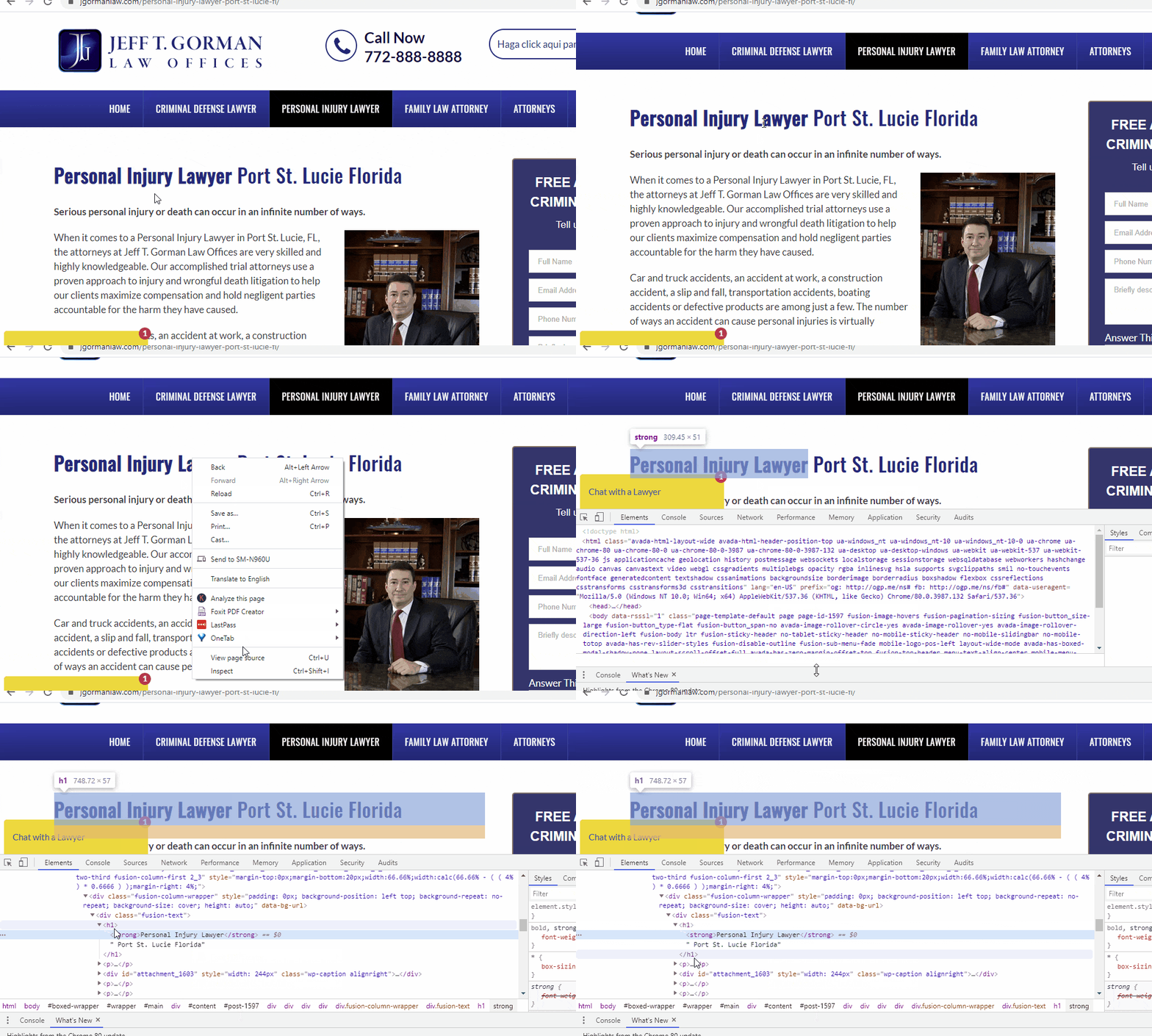
  • This title MUST be in an H1 tag AND the only H1 tag on the page
Here is an example of how to check your tag…
 

9. Hero Image

  • This is an image that can either be in the header or as a complimentary image to the description text in the first copy section of the page.

  • This image can be of your core offer (action shot eg. service truck or crew in the field) or a more personal image of the owner. 


10. Service / Product Overview

  • An overview of your product or service. 

  • Important to include your focus keyword in the first sentence of the copy. 

  • Ideally, have the focus keyword link to the internal page on your site which talk more in-depth on the topic.

11 & 12 Focus Service / Product Highlight

  • This is where you showcase your main services/products, and allow people to go deeper by providing a link to your main services page.

  • Don’t put everything here, just the top services. Then a link (button) to a services overview page that talks about each service with links to them individually.

13. Testimonials

  • A testimonial section that further builds trust and social proof for your business.

  • Use Schema formatting to add these. If you are using WordPress for your website, there are plugins that will simply “PULL” the reviews from your Google My Business reviews and dynamically display them on your site. 

    Example:  https://wordpress.org/plugins/widget-google-reviews/ (FREE)

14. Footer Information

In the Footer, there are several items you can add which will increase your conversion, trust, authority and GMB page.

  • The Physical address or the area you serve. Please make sure this is exactly as you have entered it on your Google My Business listing:
    • Business Name
    • Address
    • Phone Number
    • Email Address

    Google will verify this with your profile listing on GMB.

  • Social links, affiliate/membership logos, licenses etc.
  • Redundant contact forms (Just another way to get in touch with you)

QUICK LINKS

FOLLOW ON FACEBOOK

ASK. LEARN. GROW.

Join our Facebook Group and ask questions about Websites, Google Searches, Online Ads and Social Media.